
Wp-cron is WordPress internal cron job. Wp-cron schedules and runs background tasks automatically, such as updates being applied, logs being rotated, sending emails at specific times, or publishing blog posts automatically (plus a lot more).
The reliability of wp-cron is a bit questionable though. So should you rely on wp-cron, should you disable wp-cron or is there a better way of doing things?
What is wp-cron?
Computers, and pieces of software need to carry out certain tasks automatically at certain times in the future. Wp-cron is WordPress’ way of carrying out a certain automated tasks at a certain time.
Developers who make plugins and themes can hook into wp-cron (or action scheduler which is built in wp cron) to make their plugin or theme carry out a certain task at a certain time. For example, if you’ve installed and configured an updates manager to update automatically, wp-cron is what causes the updating to be triggered.
How wp-cron differs from cron.
Wp-cron in WordPress is a pseudo-cron system, while normal cron is a true operating system scheduler. The key difference is what actually triggers the jobs.
Wp-cron, like all PHP doesn’t run continuously in the background. Instead, it checks whether any scheduled tasks are due only when someone loads a page on your site, and then it runs whatever is queued at that moment. If your site gets no traffic, wp-cron may not run at all, and if you get a traffic spike it can run multiple times in parallel, which can sometimes cause delays or overlap.
A normal cron (like Linux system cron) runs independently of web traffic. It is controlled by the server operating system and executes commands at exact scheduled times, such as every minute or every hour, regardless of whether anyone is visiting the site. This makes it much more reliable for time critical tasks.
So you’ve got wp-cron, which relies on your site being accessed, and server side cron, which runs independently of your site being accessed.
The problem with wp-cron.
If your site isn’t accessed, wp-cron doesn’t run. This means that jobs hooked into action scheduler and wp-cron don’t run when they should. This can cause tasks to accumulate over time. When someone does access your site, wp-cron then runs, and the jobs in wp-cron and action scheduler are then run.
Although WordPress has improved how wp-cron runs, if your site hasn’t been accessed for a while, when it is accessed it’s doing a lot more than just loading a page, it’s also doing all the backed up wp-cron based jobs. This can cause delays in page load times.
Really, the problem with wp-cron is that it might not run for some time, and if it hasn’t for some time, when your website is eventually accessed, wp-cron running can make your site load more slowly than it normally would.
Why does the problem with wp-cron exist?
By default PHP can’t directly interact with the server’s underlying cron system. In other words, WordPress (running on PHP) can’t instruct the operating system to execute a task at an exact time in the same way a native cron daemon can. Because of this limitation, WordPress implements its own scheduling system called wp-cron as a workaround.
Wp-cron effectively simulates scheduled tasks by checking whether any jobs are due to run when a page is requested. If something is due, it runs it at that point in time. This makes it a practical alternative to a true cron job, although it is still reliant on your site being accessed, as PHP isn’t persistently run.
The trade off is that wp-cron is not truly time based or guaranteed to run precisely on schedule, because it depends on site traffic to trigger execution.
Should you just disable wp-cron?
Disabling wp-cron alone isn’t a good idea. Doing this would be like turning off all jobs that should run over time. As these jobs serve a purpose, if you disable wp-cron, all those purposes are negated. Wp-cron exists for a reason, plugin, theme and WordPress developers use it, and disabling it stops what it’s been used for working.
So no, you shouldn’t just disable wp-cron.
How to manage wp-cron.
The advisable way of managing wp-cron is to disable it in your website’s wp-config.php file, and set up a true cron job in your hosting to call wp-cron at specific times.
How to disable wp-cron in WordPress’ wp-config.php file.
To disable wp-cron, you’ll need to access the file manager in your hosting to be able to open and edit your site’s wp-config.php file. The wp-config.php file is held in your website’s document root (public_html if you’re using cPanel with a single site setup).
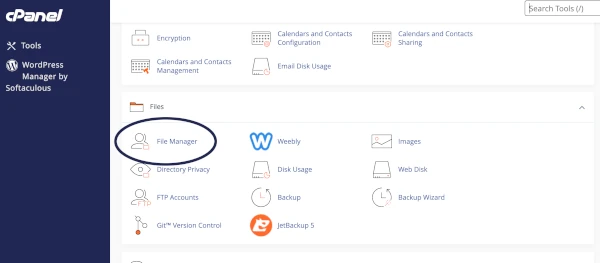
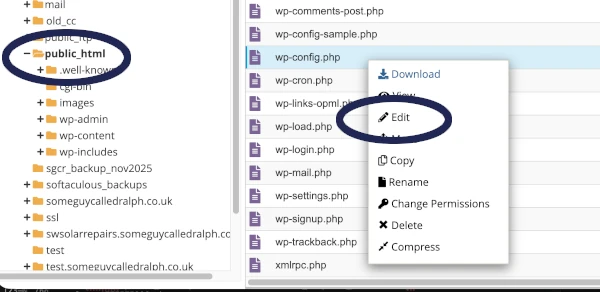
Navigate to public_html, then right click on wp-config.php, then select edit.
Scroll down until you see:
/* That's all, stop editing! Happy blogging. */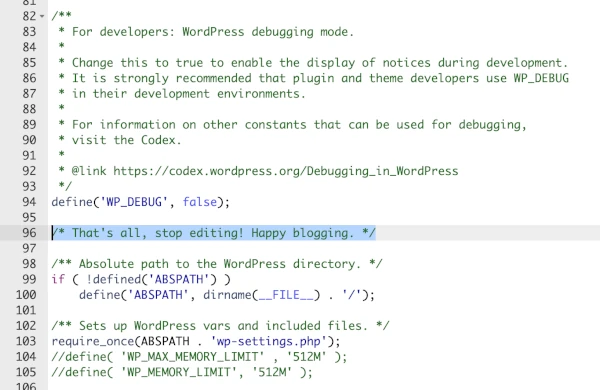
Just above this line add the following then save changes:
 /* Disable WP_CRON */
define('DISABLE_WP_CRON', true);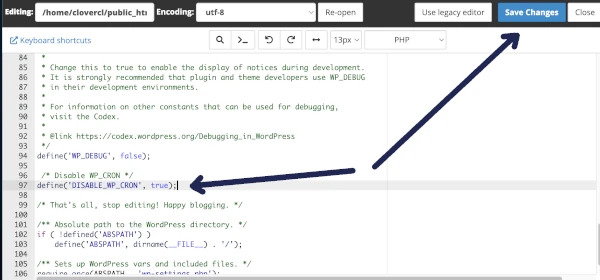
That’s WordPress’ wp-cron disabled, but now we need to set up a true cron job, so that timed events and tasks still run and function.
How to add a true cron job for wp-cron.
In your hosting there’s usually a facility to manage cron jobs. In cPanel this is called “cron jobs”.
To set up a new cron job to trigger wp-cron being run, click the wp-cron icon.

In the “common settings” drop down, select how frequently you’d like wp-cron to run (once per hour, or twice per day).
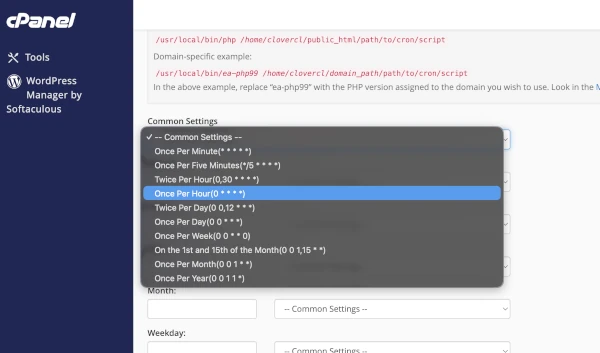
Or you can manually specify how frequently the cron job should run using the respective drop down boxes.
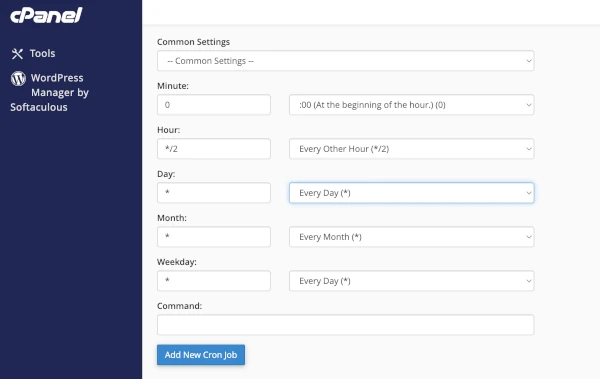
In the “command” field enter:
wget -q -O - https://www.yourwebsitesaddress.com/wp-cron.php >/dev/null 2>&1Then click “add new cron job”:
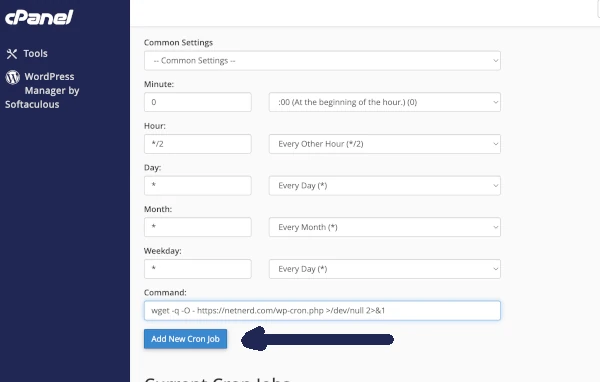
There are alternative commands you can use to call wp-cron such as:
cd ~/public_html; php -q wp-cron.phpThis uses php inside your hosting account to run wp-cron, whereas the command above calls the wp-cron function as a publicly accessible file using wget. Both have the same effect, which is to run wp-cron at a time defined in your cron job.
Wp-cron FAQ.
What is WP-Cron?
WP-Cron is WordPress’s built-in scheduling system that runs automated tasks such as publishing scheduled posts, sending emails, checking for updates, and running plugin-related background jobs.
Why does WP-Cron exist?
WP-Cron exists because PHP and WordPress cannot directly create real server cron jobs. It acts as a workaround by triggering scheduled tasks when someone visits the website.
How does WP-Cron work?
WP-Cron checks for scheduled tasks on each page load. If a task is due, it runs in the background during that request. This means it depends on site traffic to execute jobs.
What is the problem with WP-Cron?
WP-Cron is not truly time-based. On low-traffic sites, tasks may run late or not at all. On high-traffic sites, it can run too frequently and create unnecessary server load.
What is a real cron job?
A real cron job is a server-level scheduler that runs commands at fixed intervals, independent of website traffic. It is more reliable and predictable than WP-Cron.
Should you disable WP-Cron?
You should not disable WP-Cron unless you replace it with a real cron job. Disabling it without a replacement will stop important background tasks from running.
How do you replace WP-Cron with a real cron job?
You disable WP-Cron in the wp-config.php file and then create a server cron job that calls wp-cron.php at regular intervals, typically every 5–15 minutes.
What kinds of tasks use WP-Cron?
WP-Cron is used for scheduled posts, plugin and theme updates, WooCommerce tasks like order processing and emails, backups, and other automated background processes.