

One of the most common WordPress support issues is “my website isn’t sending emails”. These might be contact form emails, order notifications or password reset emails. They all use the same underlying services to be generated, sent, and even received. As you need these emails to be sent by your WordPress website, you’ll need to get to the bottom of this, and address these problems. This post covers how to work out what’s going on, and to fix the problem.
How WordPress Sends Email by Default
Out of the box, and unless configured otherwise, wordPress uses PHP’s built-in mail() function to generate emails.
When mail() is used to generate an email, PHP generates this, then hands it off to the SMTP server, which sends it off to the address in the to header.
There’s no authentication (submission of a username and password), there’s no guarantee of delivery, and in some cases, there’s not even a from header set. If there is no from header set, usually the form address will default to user-running-php@server-hostname.com as the PHP generating the email is being run by a user. The user of the account containing the PHP.
As you can probably imagine, this is a bit open to abuse, and it does get abused. Spammers often inject PHP scripts into vulnerable sites that will generate emails with forged from headers (more on this later).
Some hosting providers go as far as disabling PHP’s mail() function to stop the spam, but if they do this, WordPress effectively needs to be configured around the lack of PHP mail().
We don’t disable mail() at netnerd.com because we have a lot of self hosting people and not everyone knows about all of this, so if we did disable mail() we’d get hit with about 200 support tickets. Then again, if enough of our customers read this blog we MIGHT be able to disable PHP mail() in the future. I can live in hope (or some kind of optimistic delusion, depending on your point of view).
How to check if PHP mail() is available in your hosting.
A phpinfo can be used to echo the local environment to a browser.
How you do this is by creating a file called info.php in the public_html (or equivalent document root) of your hosting. Then you put this in the info.php file, then save it:
<?php
phpinfo();
?>
If you then browse to https://your-website.com/info.php
You’ll see something that looks like this:
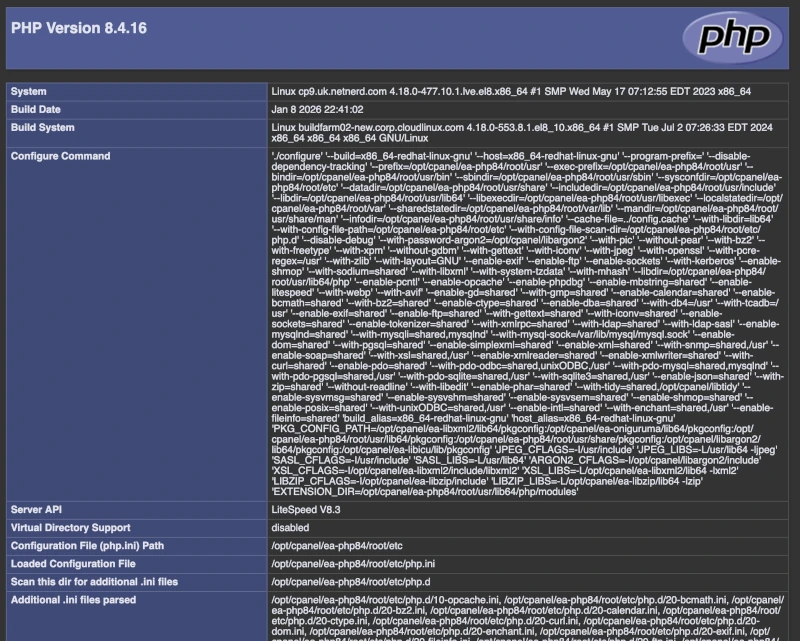
What you’re looking for is this:

It’s also worth checking that mail isn’t listed in disabled functions:

At this point, you might think that you’re all good with these emails, but even though PHP mail() is present this might allow for WordPress to send an email, but using mail() can have problems with deliverability so it doesn’t mean that the email will be received.
Why sending emails using PHP mail() isn’t very reliable.
PHP generated spam is annoying to you, but it costs mail providers money in terms of storage, so they take a lot of measures to avoid receiving PHP generated spam. Unfortunately your WordPress generated emails can get caught up in this.
Mail providers can’t explicitly tell that an email was generated using PHP, but there are often characteristics that a PHP generated email will have, that providers check for.
When an email has these PHP spam like characteristics, it’s often the case that a greater level of scrutiny is applied, and your WordPress mails might route to junk or be flat out rejected. To mitigate this, as a bare minimum, you need to validate (or authenticate) your emails.
One of the main characteristics that’s a give away is the from address header, and the return path header. Unless PHP explicitly defines these (as a valid email address) they’ll default to user@sevrer-hostname.com, so if your cPanel username is r34jngu and you’re hosted on cp1.uk.netnerd.com both the from header and the retrurn path will default to r34jngu@cp1.uk.netnerd.com which both looks suspicious and is likely to fail spam checks.
Part of the reason that spam checks are carried out on the from header is because spammers will fake this header (using PHP to define a fake from address) to make the email look like it was sent by some other party. This practice is called from address spoofing.
Your emails need to look like they’ve come from a valid email address, and they need to pass SPF checks to be accepted, simply because providers don’t want to receive spammy emails that don’t fulfil these criteria.
SPF you say? I do, and you need to know what that is.
What is SPF?
SPF stand for Sender Policy Framework.
SPF is a publicly advertised DNS TXT record, that you’d deploy in your domain’s DNS zone, or by using a related facility such as cPanel’s Email Deliverability feature.
DNS records are publicly advertised, so publishing a DNS TXT record is really like publishing a word or a piece of text specific to your domain, that the whole world can see (or lookup). Often DNS TXT records are used to verify that you own a domain, when you’re doing something like setting up office 365 or adding a website to Search Console.
An SPF TXT record states where emails for a domain should come from.
How SPF works
This is the SPF record for Shane’s Plastering Cornwall wesbsite at msjplastering.co.uk:
v=spf1 +a +mx +ip4:185.229.21.112 ~allWhat this means, to recipient mail sever is that emails with something@msjplastering.co.uk can come from:
- +mx = The place @msjplastering.co.uk emails route into
- +a = The IP address the msjplastering.co.uk website resolves to.
- +ip4:185.229.21.112 = The IP address of the server hosting the msjplastering.co.uk WordPress, which is where emails with something@msjplastering.co.uk from addresses originate from.
- ~all = This is a soft fail. This means that if the SPF check fails, junk, rather than reject the email.
When a recipient mail server receives an email with something@msjplastering.co.uk, the recipient mail server:
- Checks the from and return path of headers of the email, and sees no-reply@msjplastering.co.uk (because I’ve set this in my WordPress).
- Looks up the SPF record for msjplastering.co.uk and discovers the record above.
- Cross references the server sending the the email against the SPF record.
- If the server from which the incoming email was sent from is defined in the SPF record this gives an SPF pass, and the email is delivered.
- If the server from which the incoming email was sent from is NOT defined in the SPF record this gives an SPF fail, and the email is either rejected or junked.
What this means to you, is that your WordPress (or any PHP mail()) generated emails MUST PASS SPF to be delivered.
The Problem With PHP mail() Generated Emails and SPF
The main problem with PHP mail() generated emails and SPF, is the from and return path headers in WordPress generated emails, as these are used as the basis of the SPF lookup/check.
If you don’t explicitly define the from and return path headers in WordPress, these (as mentioned above) default to user@server-hostname.com.
Do you control the DNS for the server-hostname.com? No you don’t.
Does server-hostname.com’s SPF record validate your emails as being from a valid source? Probably not.
Can you update the server-hostname.com’s SPF record to validate your emails? No you can’t.
So you can’t usually “fix” the SPF record to accommodate your emails with user@server-hostname.com in headers.
But you can specify the from and return path headers of PHP mail() generated emails to be within a domain that you do control, which then allows you to apply the respective, correct SPF record to validate your emails.
How to Validate PHP mail() Generated Emails using SPF
Exactly how you specify the from and reply to headers when using WordPress and PHP mail() can vary according to things like the contact form you’re using. As a general “what you need to do” you’ll need to:
- Obtain the IP address of the server hosting your website, let’s say this is 1.2.3.4
- Set the from and return path headers to an email address within the domain of your website.
- Add +a to to the domain’s SPF record (just after the v=spf1 part)
- Include the IP address of your server in your domain’s SPF record using +ip4:1.2.3.4 just before the -a or ~a at the end.
The reason I’ve suggested using +a AND +ip4:1.2.3.4 is because this mitigates the use of a CDN, which would make the +a different from the server where the site is hosted. If you use JUST the IP address and a migration takes place, +a validates the server holding the site (as long as you’re not using a CDN).
To validate PHP mail() generated emails:
- Both the from and return path headers need to include an email address that ends in the domain of your website.
- The SPF record for the domain of your website needs to include your website’s server’s address either as an explicit IP address or as a +a.
- The SPF of the domain of your website needs to be publicly advertised (use a DNS lookup tool to check).
How Validate PHP mail() Generated Emails in WordPress
You can use a PHP snippet or an mu plugin or a functions.php in a child theme to set the from address of WordPress generated emails using:
add_filter('wp_mail_from', fn() => 'no-reply@yourdomain.co.uk');

add_filter('wp_mail_from_name', fn() => 'Your Site Name');

add_action('phpmailer_init', function ($phpmailer) {

    // Reply-To (where replies go)
    $phpmailer->addReplyTo(
        'support@yourdomain.co.uk',
        'Support Team'
    );

    // Return-Path / bounce address
    $phpmailer->Sender = 'bounces@yourdomain.co.uk';
});
In many contact forms or email generating facilities there’s usually an option that performs the same function without using code. This usually takes the form of a box labelled “from address” and you simply type what you want to be the from email in this box and save.
WordPress Emails, and Return Path headers.
WordPress doesn’t have a filter for return path headers. As this is header is used for SPF checks, this isn’t great.
It is possible to hook this using phpmailer_init, so it’s not all bad:
add_action('phpmailer_init', function($phpmailer) {
    $phpmailer->Sender = 'bounces@yourdomain.co.uk';
});
But do you really want to do this? Is there a better way of doing things?
Luckily, there is.
Use an SMTP Plugin Instead!
Using an SMTP plugin effectively takes PHP mail() out of the loop.
WordPress and mail() work like this:
WordPress wp_mail() > PHPMailer > mail() (PHP’s built-in mail function) > OS-level mailer (sendmail or postfix) > outgoing SMTP server.
When you use an SMTP plugin, it works like this (and PHP mail() is never called in this scenario):
- The SMTP plugin is hooked into
wp_mail()(orphpmailer_init) - The SMTP plugin replaces PHPMailer’s transport from mail() to SMTP
- The SMTP plugin sends emails directly over your chosen SMTP server.
So the chain of events is more like: PHPMailer > SMTP connection > external server
The “Return-Path” is set by PHPMailer via Sender, not by the local mail transport, which negates the whole user@server-hostname.com from path problem!
So really, using an SMTP plugin is the best way to go if you don’t want to deploy code snippets, and you want to be able to define from and return path headers.
Implications of Using an SMTP plugin
Just to get started with an SMTP plugin you’ll need to install, activate and configure this.
Installing and activating is just the same as any other plugin. To be able to configure the SMTP plugin, you’ll need to set up a mailbox so that you have a username, password and mail server address, all of which are required for SMTP plugin configuration.
Local Mailboxes
You’ll also need to take into account “where” this mailbox exists (on which server), and where emails for your domain route (or arrive) which is based on your domain’s MX record.
If your website and your mailboxes are held on the same server (local) this is all a lot easier. Netnerd’s WordPress web hosting works like this by default.
You’d simply create a mailbox in your cPanel, making a note of the email address (which is used as the username) and the password you set, and you’d then configure the SMTP plugin with:
Username: The email address you created
Password: The password you set when creating the mailbox
SMTP server address: localhost
Encryption: None (you don’t need it as nothing is sent over the network due to the local aspect)
Auto TLS (off): As per the above
As your mailboxes and website exist on the same server the +a in the domain’s SPF, or the +ip4: being the IP address of your cPanel results in an SPF pass.
Remote Mailboxes
You can set up a remote mailbox and authenticate against it using the SMTP plugin’s settings. The process is roughly the same (set up the mailbox, then configure the SMTP plugin accordingly) but you will need to use encryption in this context as a password is sent over the network.
You might need to obtain SMTP settings in addition from the party hosting the mailbox.
You might also need to as your hosting provider to allow external SMTP authentication.
The main aspect you’ll have to take into account is that your domain’s SPF records needs to include any of the following:
- An include that validates the mailbox provider as a source of emails for your domain.
- +mx if your MX records (and therefore where emails arrive) resolve to the same platform as the mailbox you’re using with the SMTP plugin.
- A +ip4: that gives the IP of the server that holds the mailbox you’re using with the SMTP plugin.
The email sent by WordPress is essentially sent via the mailbox defined in the SMTP plugin’s config, so wherever that mailbox is needs to be validated as a source of emails for your domain, using your domains’ SPF record.
A Mixture of Local and Remote Mailboxes
It’s possible to use a local mailbox (within your domain) to send to external mailboxes (within your domain), that are where your human used mailboxes are held.
Imagine you have a website held with netnerd.com and you use external mailboxes with Google Workspaces. You can use a local mailbox (in your netnerd.com hosting) with the SMTP plugin, and send these WordPress generated emails off to the external mailboxes held with Google Workspaces.
When you’re doing this, you’re only really using the local mailbox for authenticating and sending via the local SMTP server, you’re not going to receive any emails in this local mailbox.
Usually you have to flip a switch in your hosting to make the emails route externally. In cPanel this is called email routing:

In the email routing section you MUST set the email routing to remote, if you’re using functional mailboxes with a provider external to your cPanel:
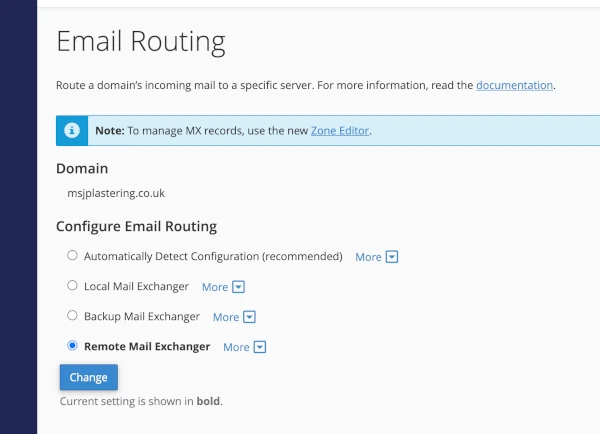
What this does is add the domain to /etc/remotedomains in the underlying OS, which tells the SMTP server to do an MX lookup and route mails to the external provide (Google Workspaces in this example) rather than trying to deliver to local mailboxes in your cPanel.
In this context your domain’s SPF record needs to include:
- +a (if you’re not using a CDN with your site)
- +ip4: with the IP address of the server hosting your site (if you’re not using a CDN)
Both of the above validate your website, and the local mailbox (being used for SMTP authentication) as sources of emails for your domain.
FAQ: WordPress Emails Aren’t Working: PHP Mail, Delivery & Acceptance Explained
Why aren’t my WordPress emails being delivered?
y default, WordPress uses PHP’s mail() function, which sends emails through your server. Many mail providers distrust unauthenticated messages from shared hosting, so they may mark them as spam or reject them.
Can I use PHP mail() reliably?
PHP mail() is often unreliable for deliverability because it lacks authentication. SPF, and maybe DKIM checks may fail if the email doesn’t come from a properly configured domain.
How do From, Reply-To, and Return-Path headers affect deliverability?
The From header is what recipients see, Reply-To is where replies go, and Return-Path is used for SPF and bounce handling. Misconfigured Return-Path often causes SPF failures.
Can I set the Return-Path in WordPress?
WordPress doesn’t have a built-in filter for Return-Path, but you can set it via the phpmailer_init hook in functions.php:
add_action('phpmailer_init', function($phpmailer) {
    $phpmailer->Sender = 'bounces@yourdomain.com';
});
Will using an SMTP plugin help?
Yes. SMTP plugins bypass PHP mail() entirely, sending emails via a proper SMTP server with authentication. This improves deliverability and ensures SPF/DKIM alignment.